 ViewCSV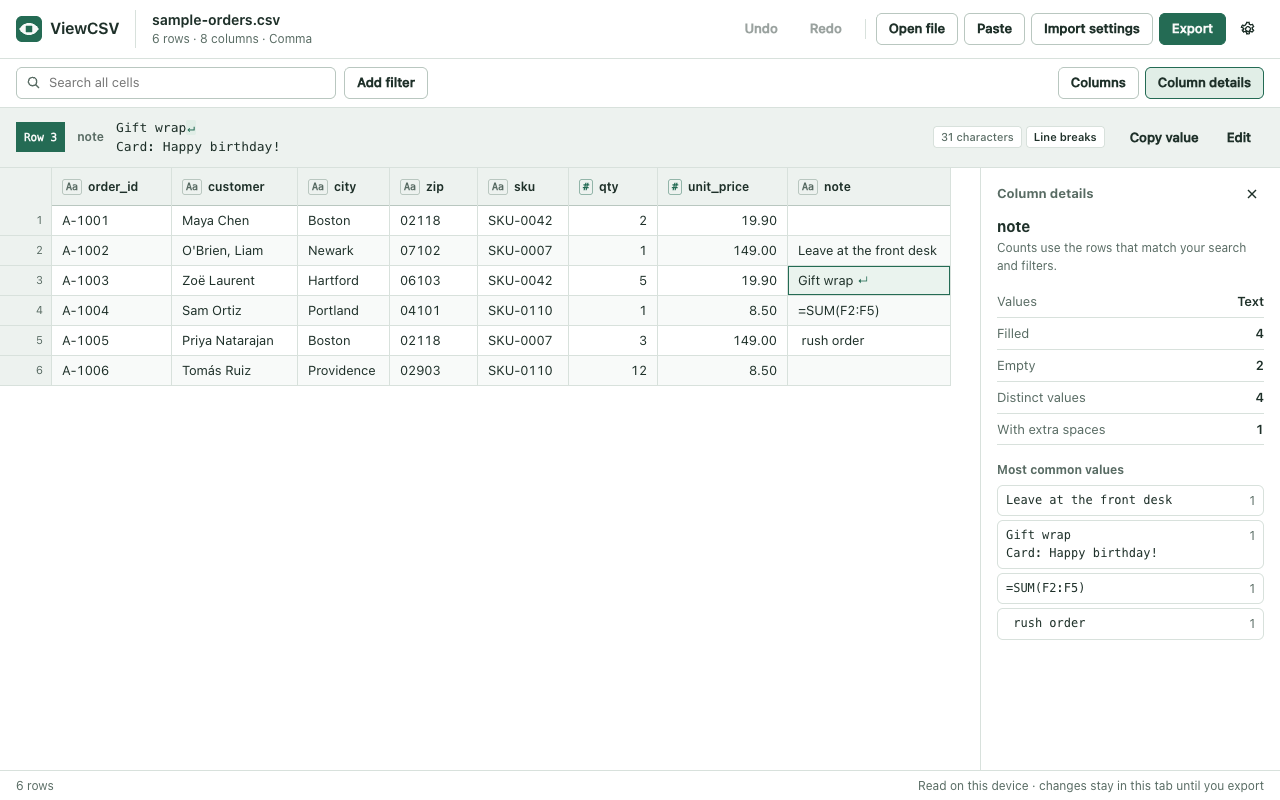
The ViewCSV extension opens tabular data inside your browser and shows every value exactly as written: CSV and TSV files, pasted text, CSV links you choose and the HTML tables on the page you're viewing. It runs entirely on your device and is built for Chromium browsers version 120 or later, such as Chrome and Edge. It has been tested locally in Chromium, not yet in Edge itself, and is not yet published in the Chrome Web Store or Microsoft Edge Add-ons.
What it's for
Checking exports without opening a spreadsheet: finding an order in a shop export, scanning a bank statement, or making sure a contact list is clean before you import it. A spreadsheet often changes what it opens — ZIP codes like 02118 lose their leading zero and long IDs turn into 1.23E+19. ViewCSV keeps every value as text.
Four ways to open data
Everything opens in a ViewCSV tab, so the data stays put while you copy, switch tabs or come back later.
- Files: choose a CSV, TSV or TXT file, or drop it anywhere on the ViewCSV tab.
- Pasted text: paste rows copied from a file, an email or a spreadsheet.
- Tables on a web page: click the ViewCSV toolbar button, choose Find tables, then pick one of the tables listed.
- CSV links: right-click a link to a .csv or .tsv file and choose Open link in ViewCSV. The file is downloaded only after you allow access to that one site.
What you can do with the table
- Search all cells, and filter rows with conditions such as contains, is, starts with, is empty, greater than or less than.
- Sort columns, hide or rename columns, edit cells, delete rows, and undo or redo up to 200 changes.
- See column details: filled and empty cells, distinct values, values with leading zeros or extra spaces, smallest and largest number, and the most common values.
- Export as CSV (comma, semicolon, tab or pipe), TSV or JSON, or copy to the clipboard.
See the exact value of a cell
Select a cell and the bar above the table shows its value character for character. Spaces at the start or end, tabs, line breaks, non-breaking spaces and invisible characters are marked, and short flags point out leading zeros, line breaks and text a spreadsheet could run as a formula. It answers the usual question: why don't these two values match?
How values are treated
- Every value stays text exactly as in the source. Nothing is converted, so leading zeros and long numbers survive.
- Sorting, numeric filters and minimum/maximum treat a value as a number only when it is a plain decimal with an optional sign and a dot as the decimal separator, such as -12.5 or 1500.25. Comparisons are exact for any number of digits.
- Values with a decimal comma (1.234,50), thousands separators, currency symbols, exponents (1e5) or dates are compared as text. A column that contains leading zeros is treated as text.
- Delimiter detection recognizes comma, semicolon, tab and pipe; you can also choose one. Encoding detection reads UTF-8 and UTF-16 with a byte-order mark; other encodings are chosen in Import settings.
Limits
MB here means 1,048,576 bytes. Larger data is refused with a message rather than opened partially.
- File: 52,428,800 bytes (50 MB).
- Pasted text: 52,428,800 characters in the ViewCSV tab; 4,194,304 characters in the toolbar popup's paste box.
- Table size: 1,000,000 rows, 1,000 columns and 5,000,000 cells, counted after short rows are padded; a header row is not counted.
- Export: 209,715,200 bytes (200 MB) of UTF-8. Copy to clipboard: 5,000,000 characters.
- CSV link download: 52,428,800 bytes, 60 seconds.
What it doesn't open
- Excel and other spreadsheet workbooks (XLSX, XLS, ODS). Save them as CSV UTF-8 first.
- Compressed files such as .gz, and PDF.
- Links to files on your computer (file:// addresses). Open those with Choose file instead.
- Tables inside frames from another site, and grids built without HTML table markup.
- Saving or syncing: changes stay in the tab until you export.
Privacy in short
The extension has no server and sends your files, pasted text and tables nowhere, including viewcsv.app. It contains no analytics or tracking, and no code or WebAssembly is loaded from the internet: everything it runs is in the package. It stores only your language and appearance choice. When you open a CSV link, your browser downloads the file directly from that site, without your cookies.
Permissions
- Access to the current tab when you click the toolbar button (activeTab, scripting): to find and read its tables.
- Context menu (contextMenus): the Open link in ViewCSV item.
- Storage (storage): language and appearance, and a short-lived handoff from the popup to the ViewCSV tab.
- Site access, optional: asked for one site at a time, only when you choose Allow and open for a CSV link, and removed afterwards unless you keep it.
Availability
Version 1.0.0 is built for Chromium-based browsers version 120 and later, such as Google Chrome and Microsoft Edge, and was tested locally in Chromium; it has not yet been tested in Microsoft Edge itself. It has not been submitted to the Chrome Web Store or Microsoft Edge Add-ons yet, so there is no store page. The ViewCSV website works without the extension.
Languages
The interface is available in English, Deutsch, Italiano, 日本語, 한국어, Русский, Español, Français, Português (Brasil), 简体中文, Nederlands, Polski, Türkçe, Bahasa Indonesia and العربية, with right-to-left layout for Arabic. It follows your browser language, or you can choose one in Settings. Changing the language never changes your data.
Questions and answers
Is the extension in the Chrome Web Store or Edge Add-ons?
Not yet. Version 1.0.0 is built and tested locally in Chromium, but it hasn't been submitted, so there is no store page, rating or install count to show.
Does it upload my files?
No. Files, pasted text and tables are read in the ViewCSV tab on your device. The extension has no server.
How is it different from the ViewCSV website?
The extension can read tables on the page you are viewing and open CSV links without saving them first. The website has more conversion and editing tools. They are separate: the extension doesn't send anything to the website.
Can it open Excel files?
No. Save the workbook as CSV UTF-8 in your spreadsheet app and open that file.
Will my leading zeros be kept?
Yes. Values are never converted, so 00501 stays 00501 in the table and in every export.